
Software
Software is a set of programs written for computer to perform specific task. Software is the interface between the user and the computer.
Catoegries of Software:
Cloud Computing
Cloud computing is the delivery of computer services including, storage, database, networking, software and intelligence, over the internet.
Internet of Things:
It refers to the network of physical devices, vehicles, building and other object which are embeded with software, sensors and network connectivity, allowing them to coolect and exchange data.
Mobile Computing
Mobile computing is the portable computers likes smartphone, tablet and laptops to acess and process information while move on.
Importance of mobile computing:
Difference Between Compiler and Interpreter
Compiler
A compiler is a software program that translates the source code written in a high-level programming language into machine code or an intermediate code that can be executed directly by the computer's hardware. The compilation process involves several stages, such as lexical analysis, syntax analysis, semantic analysis, code optimization, and code generation.
Key characteristics of compilers include:
- Compilers translate the entire source code into machine code before execution.
- They generate an executable file or binary code that can be run independently.
- Compilation is a one-time process, and the resulting program can be executed repeatedly without the need for recompilation unless changes are made to the source code.
- Compilers perform extensive optimizations to generate efficient machine code.
Interpreter
An interpreter is a software program that directly executes the source code line by line without prior translation into machine code. It reads the source code, interprets it, and executes the corresponding instructions. The interpretation process involves scanning, parsing, and executing the code sequentially.
Key characteristics of interpreters include:
- Interpreters execute the source code directly without generating an independent executable.
- They interpret and execute code line by line, typically on the fly.
- Interpretation occurs at runtime, which means the program is not pre-compiled and can be modified or extended dynamically.
- Interpreters usually provide better error diagnostics and debugging capabilities compared to compilers.
Comparison
| Compiler | Interpreter |
|---|---|
| Translates the entire source code into machine code | Executes the source code line by line |
| Generates an executable file | Does not generate a separate executable |
| Compilation is a one-time process | Interpretation occurs at runtime |
| Requires recompilation for code changes | Allows dynamic modifications without recompilation |
| Produces optimized machine code | Generally slower than compiled code |
| Commonly used in languages like C, C++, Java | Commonly used in languages like Python, JavaScript |
Logic Gates
AND Gate
The AND gate has two or more inputs and a single output. The output of the AND gate is HIGH (1) only when all of its inputs are HIGH; otherwise, the output is LOW (0). The Boolean expression for the AND gate is: Output = Input1 AND Input2 AND ... AND InputN.
| Input1 | Input2 | Output |
|---|---|---|
| 0 | 0 | 0 |
| 0 | 1 | 0 |
| 1 | 0 | 0 |
| 1 | 1 | 1 |
OR Gate
The OR gate also has two or more inputs and a single output. The output of the OR gate is HIGH (1) if any of its inputs are HIGH; otherwise, the output is LOW (0). The Boolean expression for the OR gate is: Output = Input1 OR Input2 OR ... OR InputN.
| Input1 | Input2 | Output |
|---|---|---|
| 0 | 0 | 0 |
| 0 | 1 | 1 |
| 1 | 0 | 1 |
| 1 | 1 | 1 |
XOR Gate
The XOR (Exclusive OR) gate also has two inputs and a single output. The output of the XOR gate is HIGH (1) if the number of HIGH inputs is odd; otherwise, the output is LOW (0). The Boolean expression for the XOR gate is: Output = Input1 XOR Input2.
| Input1 | Input2 | Output |
|---|---|---|
| 0 | 0 | 0 |
| 0 | 1 | 1 |
| 1 | 0 | 1 |
| 1 | 1 | 0 |
NAND Gate
The NAND (NOT AND) gate is a combination of an AND gate followed by a NOT gate. The output of the NAND gate is the inverse of the AND gate output. The Boolean expression for the NAND gate is: Output = NOT (Input1 AND Input2 AND ... AND InputN).
| Input1 | Input2 | Output |
|---|---|---|
| 0 | 0 | 1 |
| 0 | 1 | 1 |
| 1 | 0 | 1 |
| 1 | 1 | 0 |
Bus Architecture
In computer architecture, bus architecture refers to the structure and organization of communication pathways within a computer system. Buses act as channels through which different components of the system exchange data and control signals. They enable the efficient transfer of information and coordination of activities among various hardware components.
A bus architecture is a communication system that transfers data between components inside a single computer or between multiple computers. Buses are used to connect the different components of a computer, such as the CPU, memory, and I/O devices.
Key aspects of bus architecture:
- Data Transfer: Buses facilitate the transfer of data between components, such as the CPU, memory, input/output devices, and peripherals. They provide a communication pathway for exchanging binary information that represents instructions, operands, and results.
- Control Signals: Buses also carry control signals that coordinate the operation of different components. These signals include commands for memory read/write operations, interrupt requests, clock synchronization, and bus arbitration to manage access to the bus.
- Types of Buses: There are several types of buses found in computer architectures:
Types of Buses
1. Address Bus
The address bus carries memory addresses generated by the CPU to specify the location of data or instructions to be read from or written to in the memory. It determines the maximum addressable memory of the system.
2. Data Bus
The data bus is responsible for transferring actual data between the CPU and other devices, such as memory, input/output devices, and peripherals. It carries the binary information that represents instructions, operands, and results.
3. Control Bus
The control bus carries control signals that govern the operation and coordination of various components within the computer system. It includes signals for activities like memory read/write operations, interrupt requests, clock signals, and bus arbitration.
4. System Bus
The system bus refers to a combination of the address bus, data bus, and control bus. It provides a unified communication pathway for all major components in the computer system, allowing them to exchange information and coordinate their activities.
5. Expansion Bus
An expansion bus is used to connect expansion cards or peripheral devices to the computer's motherboard. It enables the addition of new functionality to the system by allowing devices like graphics cards, network cards, and sound cards to communicate with the CPU and memory.
Different Types of Secondary Memory
Secondary memory is a type of computer storage that is used to store data and programs that are not currently being used by the computer's main memory. Secondary memory is typically much slower than main memory, but it is also much cheaper and has a much larger capacity.
In a computer system, secondary memory refers to storage devices that provide non-volatile, long-term storage for data and programs. Unlike primary memory (RAM), secondary memory retains data even when the computer is powered off. Here are the different types of secondary memory commonly used in computer systems:
There are many different types of secondary memory, including:
- Hard disk drives (HDDs): HDDs are the most common type of secondary memory. They are made up of a stack of rotating disks coated with a magnetic material. Data is stored on the disks by magnetizing tiny areas of the surface. HDDs are relatively slow, but they have a large capacity and are relatively inexpensive.
- Solid-state drives (SSDs): SSDs are a newer type of secondary memory that is replacing HDDs in many applications. SSDs do not have any moving parts, which makes them much faster than HDDs. SSDs are also more expensive than HDDs, but they are becoming more affordable.
- Magnetic tape drives: Magnetic tape drives are a type of secondary memory that was once very popular, but they have been largely replaced by HDDs and SSDs. Magnetic tape drives are very slow, but they have a very large capacity and are relatively inexpensive.
- Optical discs: Optical discs are a type of secondary memory that uses a laser to read and write data. Optical discs come in a variety of formats, including CDs, DVDs, and Blu-ray discs. Optical discs are relatively slow, but they have a large capacity and are relatively inexpensive.
- USB Flash Drives:A USB flash drive, also known as a thumb drive or a pen drive, is a portable storage device that uses flash memory to store data. It connects to a computer through a USB port and provides a convenient and portable means of transferring and storing files. USB flash drives are small, lightweight, and widely used for data backup, file transfer, and portable storage purposes.
The type of secondary memory that is used in a computer system depends on the needs of the system. For example, a high-performance computer system will typically use SSDs, while a low-cost computer system may use HDDs.
Decimal to Binary Conversion
Decimal to binary conversion is the process of converting a decimal (base 10) number to its binary (base 2) representation. Binary numbers use only two digits, 0 and 1, and are commonly used in digital systems and computer programming. Here is the step-by-step process for converting a decimal number to binary:
Example:
Let's convert the decimal number 25 to binary.
Step 1:
Start with the decimal number you want to convert. In this example, we have 25.
Step 2:
Divide the decimal number by 2 and note down the remainder.
25 divided by 2 equals 12 with a remainder of 1. So, the remainder is 1.
Step 3:
Continue dividing the quotient obtained in the previous step by 2 and noting down the remainders until the quotient becomes 0.
12 divided by 2 equals 6 with a remainder of 0. Remainder: 0
6 divided by 2 equals 3 with a remainder of 0. Remainder: 0
3 divided by 2 equals 1 with a remainder of 1. Remainder: 1
1 divided by 2 equals 0 with a remainder of 1. Remainder: 1
Step 4:
Write down the remainders obtained in reverse order. This will give you the binary representation of the decimal number.
Reversing the remainders: 11001
Result:
The decimal number 25 is equivalent to the binary number 11001.
Functions of an Operating System
An operating system (OS) is a software that manages computer hardware and provides an environment for running applications. It performs a variety of functions to ensure efficient and secure operation of the computer system. Here are the key functions of an operating system:
1. Process Management
The operating system manages processes, which are the running instances of programs. It schedules and allocates system resources (CPU time, memory, and I/O devices) to different processes, ensuring fair and efficient execution. It also provides mechanisms for process creation, termination, synchronization, and communication.
2. Memory Management
The operating system manages computer memory by allocating and deallocating memory space to processes. It keeps track of which parts of memory are in use and which are available. Memory management ensures efficient utilization of memory resources and provides mechanisms for virtual memory, memory protection, and memory sharing.
3. File System Management
The operating system provides a file system that organizes and manages files on storage devices, such as hard disks or SSDs. It handles file creation, deletion, and modification, as well as file access permissions and security. File system management enables the storage, retrieval, and organization of data in a structured manner.
4. Device Management
The operating system manages input and output (I/O) devices, such as keyboards, mice, printers, and disks. It provides a consistent and standardized interface for communication between applications and devices. Device management involves device driver management, handling device interrupts, and ensuring efficient utilization of devices.
5. User Interface
The operating system provides a user interface that allows users to interact with the computer system. This can be in the form of a command-line interface (CLI) or a graphical user interface (GUI). The user interface enables users to run applications, access files, configure system settings, and perform other tasks in a user-friendly manner.
6. Network Management
In networked environments, the operating system includes functions for network management. It facilitates network connectivity, supports network protocols, and manages network resources. Network management functions include network configuration, security, and data transfer between different systems.
7. Security and Protection
The operating system provides security mechanisms to protect the computer system and its data from unauthorized access, viruses, and other malicious threats. It includes user authentication, access control, encryption, and firewall functionalities to ensure system integrity and confidentiality.
These are some of the primary functions of an operating system. The specific features and capabilities may vary depending on the type of operating system (e.g., Windows, macOS, Linux) and the intended use of the computer system.
Different Types of CSS
There are three main types of CSS:
- Inline CSS: Inline CSS is the simplest type of CSS. It is used to style individual HTML elements by adding style attributes to the element tags. For example, the following code would set the font-size of the h1 element to 24px:
This is a heading
This is a heading
This is a heading
Each type of CSS has its own advantages and disadvantages. Inline CSS is the simplest to use, but it can be difficult to maintain if you have a lot of styles. Internal CSS is more maintainable, but it can be difficult to keep track of all of the styles in a large document. External CSS is the most maintainable, but it can be more difficult to set up.
Which type of CSS you use depends on your specific needs. If you only need to style a few elements, inline CSS is a good option. If you need to style a lot of elements, internal CSS or external CSS may be a better choice.
Different Components of Multimedia
Multimedia is a combination of different media formats, such as text, audio, video, graphics, and animation. It is used to create a more engaging and interactive user experience.
- Text: Text is the most common component of multimedia. It is used to convey information, such as titles, subtitles, and captions.
- Audio: Audio is used to add sound to multimedia presentations. It can be used to create a more immersive experience, or to provide additional information.
- Video: Video is used to show moving images. It can be used to tell a story, to demonstrate a process, or to provide a visual representation of data.
- Graphics: Graphics are used to add visual interest to multimedia presentations. They can be used to illustrate concepts, to create maps, or to simply make a presentation more visually appealing.
- Animation: Animation is used to create the illusion of motion. It can be used to create characters, to show a process in action, or to simply add visual interest to a presentation.
These different components can be combined in a variety of ways to create a multimedia presentation. The most effective multimedia presentations use a combination of different components to create a more engaging and interactive user experience.
Here are some examples of how multimedia is used in different industries:
- Education: Multimedia is used in education to create more engaging and interactive learning experiences. For example, multimedia can be used to create interactive simulations, to provide virtual field trips, or to create narrated presentations.
- Business: Multimedia is used in business to create more effective marketing and training materials. For example, multimedia can be used to create interactive product demos, to provide online training courses, or to create marketing videos.
- Entertainment: Multimedia is used in entertainment to create more immersive and engaging experiences. For example, multimedia can be used to create interactive video games, to create animated movies, or to create music videos.
Multimedia is a powerful tool that can be used to create a variety of different experiences. By combining different media formats, multimedia can be used to create more engaging, interactive, and informative experiences.
Difference between do-while and while loop
| Aspect | do-while loop | while loop |
|---|---|---|
| Execution of the Loop | First executes the loop body and then checks the condition | Checks the condition at the beginning; loop body may not execute if the condition is false initially |
| Condition Checking | Checks the condition after each iteration | Checks the condition before each iteration |
| Loop Entry | Always executes the loop body at least once, regardless of the initial condition | May skip the loop body if the condition is false initially |
| Usage | Used when you want to ensure the loop body executes at least once, even if the condition is initially false | Used when the number of iterations is uncertain and depends on a condition; may not execute the loop body if the condition is false |
| Control Flow | Control flow is guaranteed to enter the loop body before condition checking | Control flow may never enter the loop body if the condition is initially false |
| Loop Termination | Depends on the condition becoming false | Depends on the condition becoming false or a break statement |
| Flexibility | Provides more flexibility as the loop body always executes at least once | Offers more flexibility in terms of loop termination based on the condition | Example | do { // code block } while (condition); | while (condition) { // code block } |
Prevention Methods of Cybercrime
Cybercrime is a growing problem, and it's important to be aware of the risks and take steps to protect yourself. Here are some prevention methods of cybercrime:
- Use strong and unique passwords:
- Create passwords with a combination of uppercase and lowercase letters, numbers, and special characters.
- Avoid using the same password for multiple accounts.
- Consider using a password manager to securely store and generate passwords.
- Enable two-factor authentication (2FA):
- Implement 2FA whenever possible to add an extra layer of security.
- Require a secondary verification method, such as a code sent to your mobile device, in addition to your password.
- Keep software and devices up to date:
- Regularly update your operating system, software applications, and security patches.
- Apply updates to protect against known vulnerabilities and exploits.
- Be cautious of phishing scams:
- Avoid clicking on suspicious links or opening email attachments from unknown sources.
- Verify the authenticity of websites and emails before providing personal or sensitive information.
- Use reputable antivirus and security software:
- Install and regularly update antivirus and anti-malware software on your devices.
- Enable real-time scanning and automatic updates for continuous protection.
- Practice safe browsing habits:
- Be cautious when visiting unfamiliar websites or downloading files from the internet.
- Avoid clicking on suspicious pop-up ads or downloading software from untrusted sources.
- Secure your Wi-Fi network:
- Use a strong, unique password for your Wi-Fi network.
- Enable encryption (WPA2 or higher) to protect your wireless communications.
- Regularly backup important data:
- Backup your important files and data on a regular basis.
- Store backups in a separate location or on a secure cloud storage service.
- Stay informed and educate yourself:
- Keep up-to-date with the latest cybersecurity news and trends.
- Learn about common cyber threats and techniques used by attackers.
- Educate yourself and others on best practices for online safety and security.
Computer Architecture - Block Diagram and Component Functions
Computer architecture refers to the organization and design of a computer system. It involves the structure, components, and interconnections that make up a computer and how they work together to perform various tasks. Here is a block diagram illustrating the key components of a computer architecture and their functions:
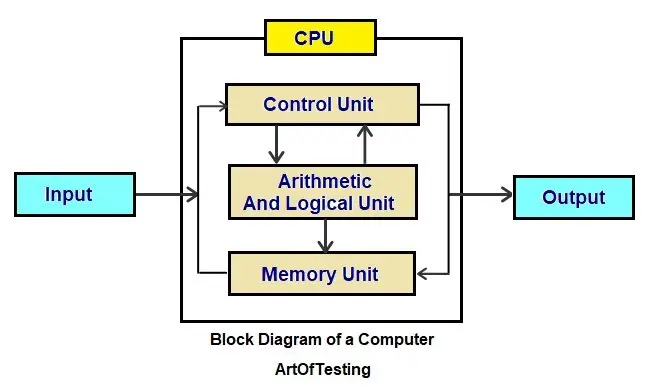
1. Central Processing Unit (CPU)
The CPU is the brain of the computer. It performs the majority of the processing and controls the operation of other components. Its main functions include:
- Fetching instructions from memory
- Decoding instructions to determine the required operations
- Executing instructions by performing arithmetic and logical operations
- Managing the flow of data between different components
2. Memory
Memory stores data and instructions that the CPU needs to perform operations. It is divided into two main types:
- Primary Memory (RAM): Provides fast access to data and instructions currently being processed by the CPU.
- Secondary Memory (Storage): Stores data and programs for long-term storage, including hard drives, solid-state drives, and external storage devices.
3. Input/Output (I/O) Devices
I/O devices facilitate communication between the computer and the external world. They allow data to be inputted into the computer or outputted from it. Common I/O devices include:
- Keyboard and mouse for inputting data
- Display monitor for visual output
- Printer for producing hard copies
- Network interface for communication over networks
4. System Bus
The system bus provides a communication pathway for transferring data and instructions between different components. It consists of three main buses:
- Data Bus: Transfers data between the CPU, memory, and I/O devices.
- Address Bus: Specifies the memory location for data transfers.
- Control Bus: Carries control signals to coordinate the operations of different components.
5. Control Unit (CU)
The control unit manages and coordinates the operations of the CPU. It interprets instructions, generates control signals, and ensures proper execution of instructions. Its functions include:
- Sequencing the fetch-decode-execute cycle
- Coordinating data transfers between components
- Managing the control signals on the system bus
6. Arithmetic Logic Unit (ALU)
The ALU performs arithmetic and logical operations on data. It handles calculations, comparisons, and logical decisions. Some common operations include addition, subtraction, multiplication, division, and bitwise operations.
7. Cache
Cache is a small, high-speed memory located between the CPU and main memory. It stores frequently accessed data and instructions, providing faster access than the main memory. The cache helps reduce the time required to fetch data from main memory, improving overall system performance.
This block diagram represents a basic overview of computer architecture. Actual computer systems may have additional components and complexities based on their intended purpose and design.
Logic Gates
AND Gate
| Input A | Input B | Output |
|---|---|---|
| 0 | 0 | 0 |
| 0 | 1 | 0 |
| 1 | 0 | 0 |
| 1 | 1 | 1 |
OR Gate
| Input A | Input B | Output |
|---|---|---|
| 0 | 0 | 0 |
| 0 | 1 | 1 |
| 1 | 0 | 1 |
| 1 | 1 | 1 |
XOR Gate
| Input A | Input B | Output |
|---|---|---|
| 0 | 0 | 0 |
| 0 | 1 | 1 |
| 1 | 0 | 1 |
| 1 | 1 | 0 |
XNOR Gate
| Input A | Input B | Output |
|---|---|---|
| 0 | 0 | 1 |
| 0 | 1 | 0 |
| 1 | 0 | 0 |
| 1 | 1 | 1 |